Contributing
Software requirements
Minimum requirements
-
Git or SourceTree or any other Git tool (for interacting, visualize and management of Git repositories)
-
An IDE like IntelliJ IDEA CE or IntelliJ PyCharm CE or IntelliJ GoLand or Visual Studio Code
-
Useful plugins:
-
GitToolbox (extends Git Integration with additional features like status display, auto fetch, inline blame annotation…)
-
File Watchers (allows executing tasks triggered by file modifications, like for running
terraform fmton file save) -
HashiCorp Terraform / HCL language support (for Terraform and HCL files syntax highlighting and completion, if needed)
-
AsciiDoc (AsciiDoc language syntax and completions for better writing of .adoc files)
-
-
Recommended software
-
Docker (for building and sharing of containerized applications and microservices)
-
AWS CLI v2 (unified tool to manage your AWS services)
-
Python 3.x (object-oriented programming language interpreter)
ArCo Development Kit
The ArCo Development Kit is a Docker container with a with the minimum software requirements for quickly start developing or contributing to Terraform modules or projects.
There is a terraform linux user with permissions to run the installed software packages and sudo privileges.
It is recommended to mount the following volumes, so the Docker container has access to your aws-cli host configuration and credentials and projects folder where you can clone the required repositories and develop using you preferred IDE:
-
AWS-CLI config: /home/terraform/.aws
-
Projects: /home/terraform/projects
The container is built over the latest Ubuntu LTS version and has the latest versions of the required software described in the ArCo Terraform software requirements.
For more information, refer to the Dockerfile.
Version Control
In ArCo we’re using the Git distributed version-control system for tracking changes in source code during software development.
Git is designed for coordinating work among developers, but it can be used to track changes in any set of files.Its goals include speed, data integrity, and support for distributed, non-linear workflows.
Development flow
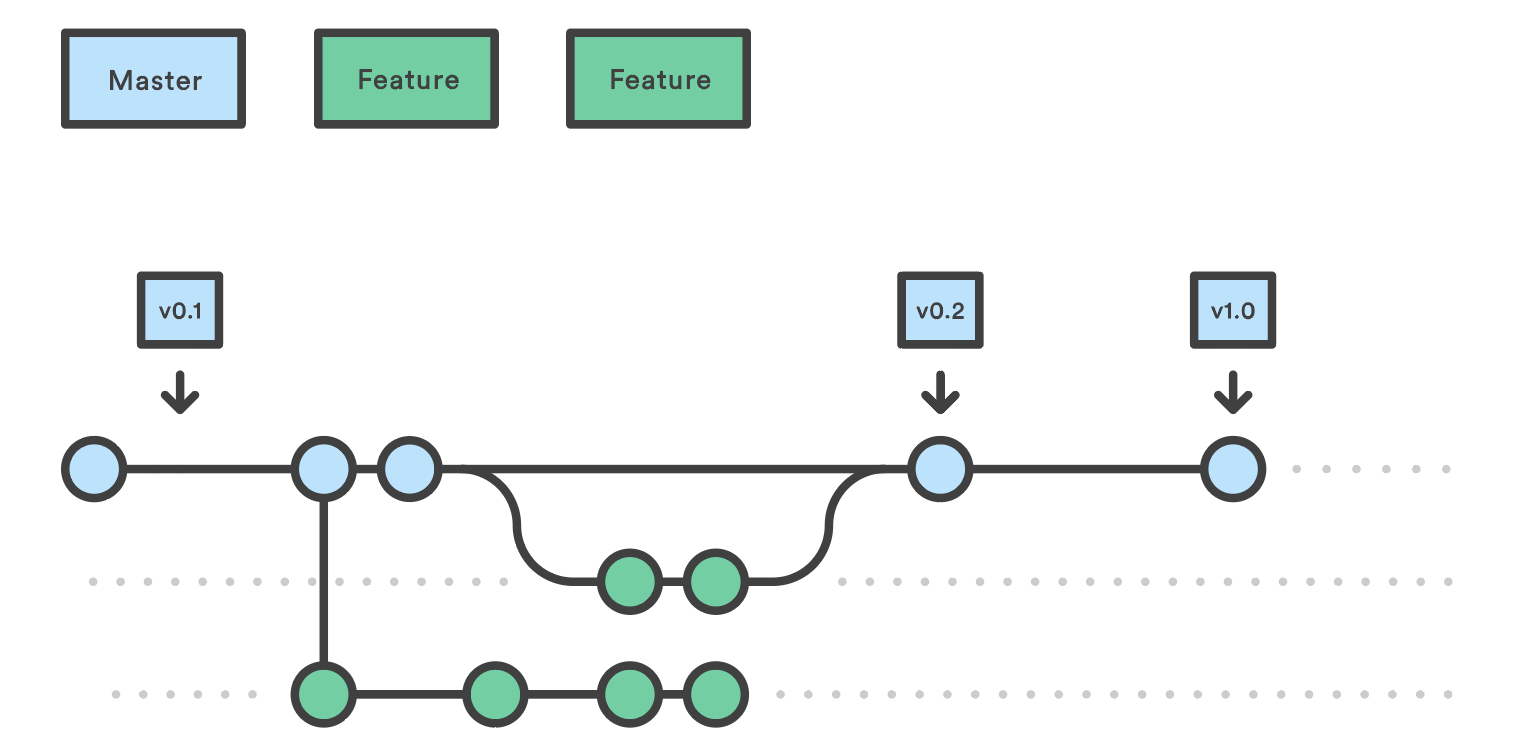
In order to keep development as easy as possible while maintaining the required branch stability, in ArCo we’ll use a Git workflow called GitHub Flow.
GitHub flow is a lightweight, branch-based workflow that supports teams and projects where deployments are made regularly.
Unlike the traditional GitFlow, instead of having a master branch that reflects the status of the latest stable release, and develop branch with the status of the next or future version, we’ll use master as source of the fix or feature branches, and the changes will be integrated over master on a fast and controlled way using Merge Requests.
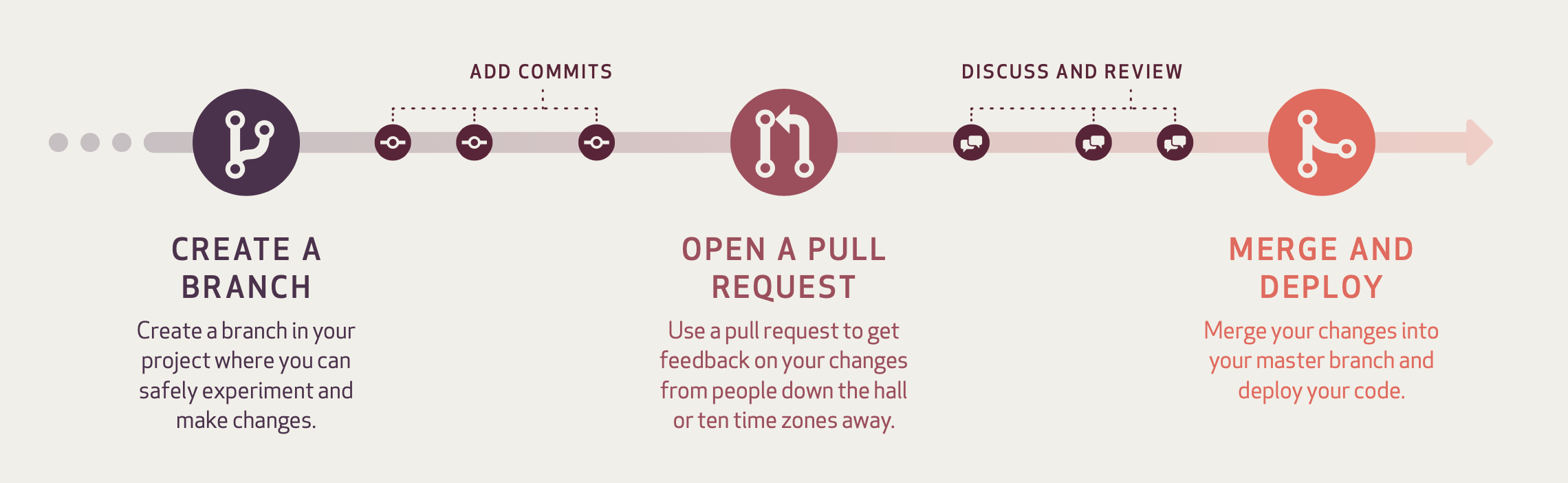
Branch
Branching is a core concept in Git, and the entire GitHub flow is based upon it. There’s only one rule: anything in the master branch is always deployable.
Because of this, it’s extremely important that your new branch is created off of master when working on a feature or a fix.Your branch name should be descriptive (e.g., feat/refactor-authentication, fix/improve-docs), so that others can see what is being worked on.
When you create a branch in your project, you’re creating an environment where you can implement new features or maybe fix some unexpected behaviours.
Changes you make on a branch don’t affect the main branch, so you’re free to experiment and commit changes, safe in the knowledge that your branch won’t be merged until it’s ready to be reviewed by someone you’re collaborating with.
Commit
Once your branch has been created, it’s time to start making changes. Whenever you add, edit, or delete a file, you’re making a commit, and adding them to your branch.This process of adding commits keeps track of your progress as you work on a feature branch.
Commits also create a transparent history of your work that others can follow to understand what you’ve done and why.Each commit has an associated commit message, which is a description explaining why a particular change was made. Furthermore, each commit is considered a separate unit of change.
This lets you roll back changes if a bug is found, or if you decide to head in a different direction.
Commit messages are important, especially since Git tracks your changes and then displays them as commits once they’re pushed to the server.By writing clear commit messages, you can make it easier for other people to follow along and provide feedback.
See the Conventional Commits section for more information about the required commit messages formaat.
Merge Request
Merge Requests (MR) initiate discussion about your commits.Because they’re tightly integrated with the underlying Git repository, anyone can see exactly what changes would be merged if they accept your request.
You can open a Merge Request at any point during the development process: when you have little or no code but want to share some screenshots or general ideas, when you’re stuck and need help or advice, or when you’re ready for someone to review your work.
Merge Requests help start code review and conversation about proposed changes before they’re merged into the master branch.
Discuss
Once a Merge Request has been opened, the person or team reviewing your changes may have questions or comments.Perhaps the coding style doesn’t match project guidelines, the change is missing tests, or maybe everything looks great and props are in order.Merge Requests are designed to encourage and capture this type of conversation.
You can also continue to push to your branch in light of discussion and feedback about your commits.If someone comments that you forgot to do something or if there is a bug in the code, you can fix it in your branch and push up the change.
Merge
Once your pull request has been reviewed and the branch passes the CI pipeline, you can deploy your changes to verify them in a test enviroment using the branch name as reference. If your branch causes issues, you can roll it back by deploying the existing master branch into the environment.
If the repository has a protected master branch, only users with maintainer permissions can accept the Merge Request and integrate your changes in the master branch.
Once merged, Merge Requests preserve a record of the historical changes to your code. Because they’re searchable, they let anyone go back in time to understand why and how a decision was made.
Conventional Commits
In ArCo, we’re using a lightweight convention on top of commit messages called Conventional Commits. It provides an easy set of rules for creating an explicit commit history; which makes it easier to write automated tools like the CHANGELOG generation or an automatic release pipeline.
The commit message should be structured as follows:
<type>[optional scope]: <description>

[optional body]

[optional footer(s)]
The commit contains the following structural elements, to communicate intent to the consumers of your library:
-
fix: a commit of the type
fixpatches a bug in your codebase (this correlates with PATCH in semantic versioning). -
feat: a commit of the type
featintroduces a new feature to the codebase (this correlates with MINOR in semantic versioning). -
BREAKING CHANGE: a commit that has a footer
BREAKING CHANGE:, or appends a!after the type/scope, introduces a breaking API change (correlating with MAJOR in semantic versioning). A BREAKING CHANGE can be part of commits of any type. -
types other than
fix:andfeat:are allowed (based on the Angular convention). This types don’t correlates with a semantic versioning bump and can bebuild:,chore:,ci:,docs:,style:,refactor:,perf:,test:, and others. -
footers other than
BREAKING CHANGE: <description>may be provided and follow a convention similar to git trailer format.
Refer to the Conventional Commits specification for more examples and the full convention specification.
TL;DR
-
Clone the required Git repository:
git clone <repository url> -
Create a new branch for your changes:
git checkout -b feature/changes-brief-description -
Add code changes, and commit them to your branch using a descriptive commit message:
git commit -m "feat: changes summary" -
Push your commits to the origin feature/fix branch:
git push origin <branch> -
Create an MR request in GitLab using your branch as source and master branch as destination
-
Wait for MR pipeline to pass, and wait for a Maintainer code review
-
If everything is OK, the Maintainer will accept the MR and your code will be integrated in the master branch